
AGENT SKILL GUIDE
Inside tradehull-dhan-live-algo-skills — a SKILL.md knowledge pack that teaches Claude Code, Cursor, and Codex how to write correct, SEBI-compliant Indian algo-trading code against the Dhan broker API.
MIT Licensed | Python | Always use latest dhanhq | Always use latest Dhan-Tradehull | Claude Code · Cursor · Codex
On this page
1. Introduction
2. Installation
3. Initial Setup
4. How It Works
5. Basic Usage
6. AI Integration
7. Best Practices
8. Common Mistakes
9. Summary
01 Introduction

What is this skill?
tradehull-dhan-live-algo-skills is an agent skill: a folder of Markdown files, written for an AI agent rather than a human, that plugs into any SKILL.md-compatible tool — Claude Code, Cursor, Codex. It teaches the agent how to correctly use the Dhan-Tradehull Python library, a wrapper around the Dhan broker’s dhanhq API, to build live algo-trading systems for NSE/BSE equities, futures, and options.
Think of it as an onboarding manual for your AI pair-programmer, written by people who’ve spent years answering the same student support questions about this exact API.
Why was it created — and what problem does it solve?
Broker APIs are easy to misuse. Left to its training data alone, a general-purpose AI agent will happily hardcode a lot size that changes every few months, call a deprecated data method, or place a MARKET order that regulators have since banned. None of these are exotic — the skill’s own documentation calls them out as recurring real mistakes. The skill exists to bake those lessons directly into the agent’s context so it doesn’t relearn them the hard way, on your capital.

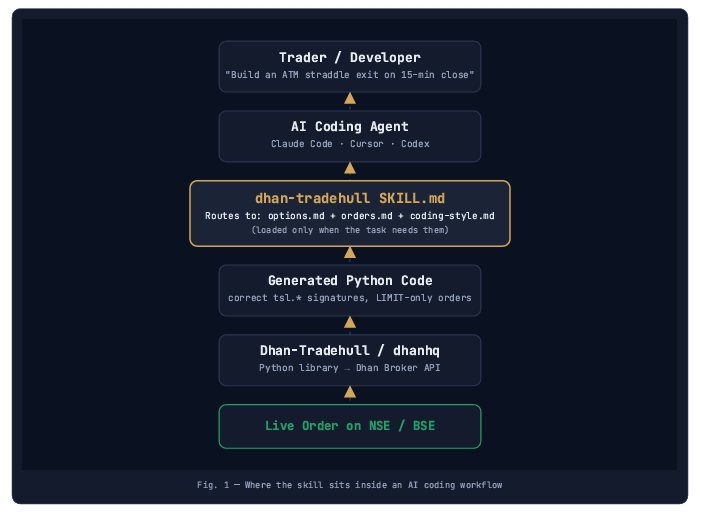
Where it’s used in AI
It lives in the tool-use / context layer of an AI coding agent. When you ask an agent to build a trading script, it can load this skill’s files into context on demand — the same way it might read a project’s own README before writing code.
02 Installation
How to Install
1. Run the install command
Open Cursor → Terminal → New Terminal, then run:
npx skills@latest add Imran-Tradehull/tradehull-dhan-live-algo-skills --skill dhan-tradehull --agent cursor2. Allow the CLI to install
The terminal asks for permission the first time. Type y and press Enter.
PS C:\Users\Mac Joe> npx skills@latest add Imran-Tradehull/tradehull-dhan-live-algo-skills --skill dhan-tradehull --agent cursor Need to install the following packages:
[email protected]
Ok to proceed? (y) y
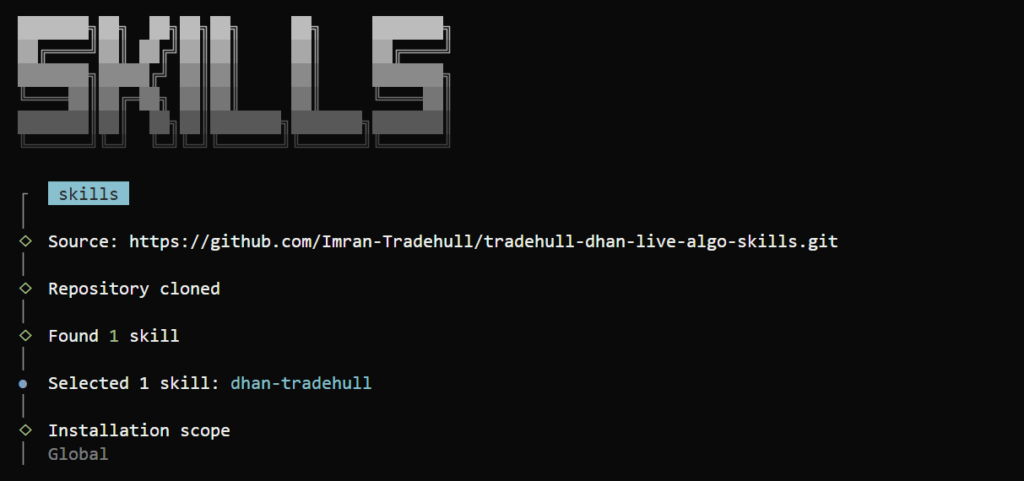
3. Confirm the skill and choose scope
The installer clones the repo, finds the skill, and asks for an installation scope — select Global.
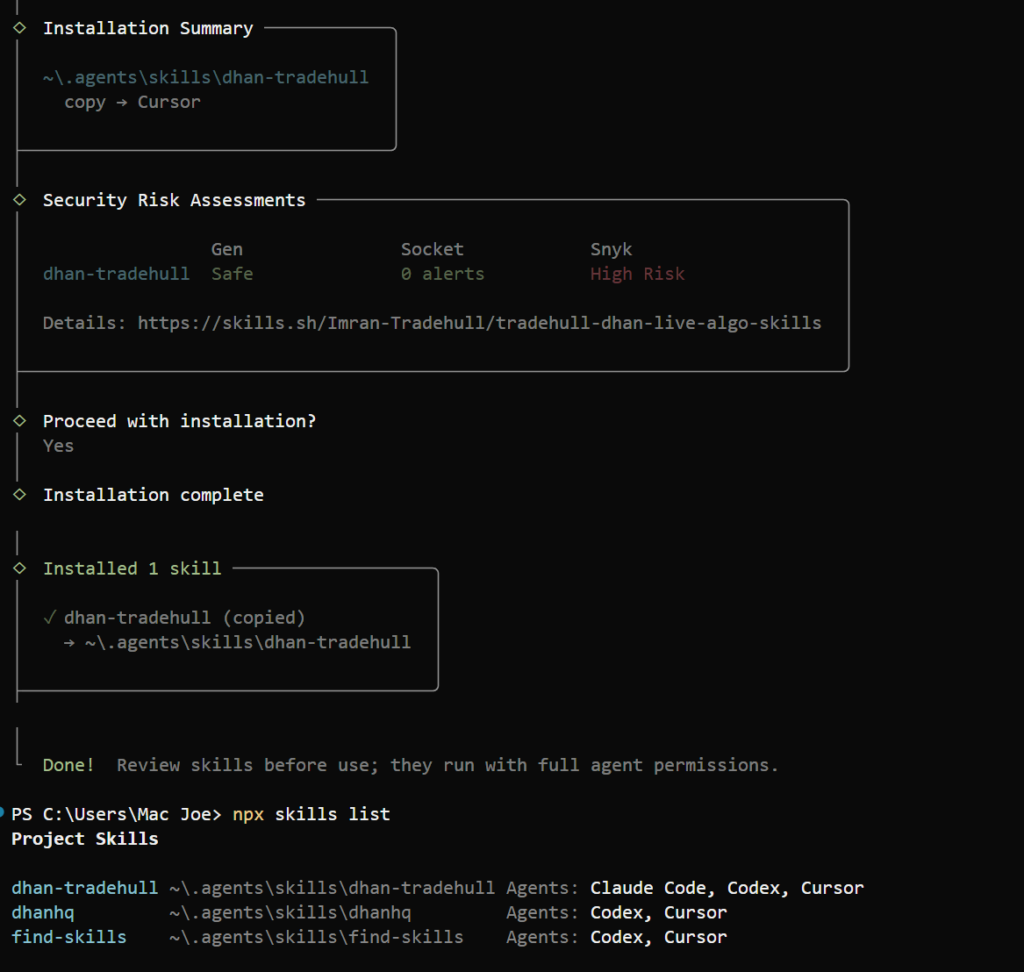
4. Finish the install
Confirm Yes when asked to proceed. You’ll see “Installation complete” and “Done!”
5. Reload Cursor
Press Ctrl+Shift+P → search Developer: Reload Window → select it. Closing and reopening Cursor also works.
How to Use
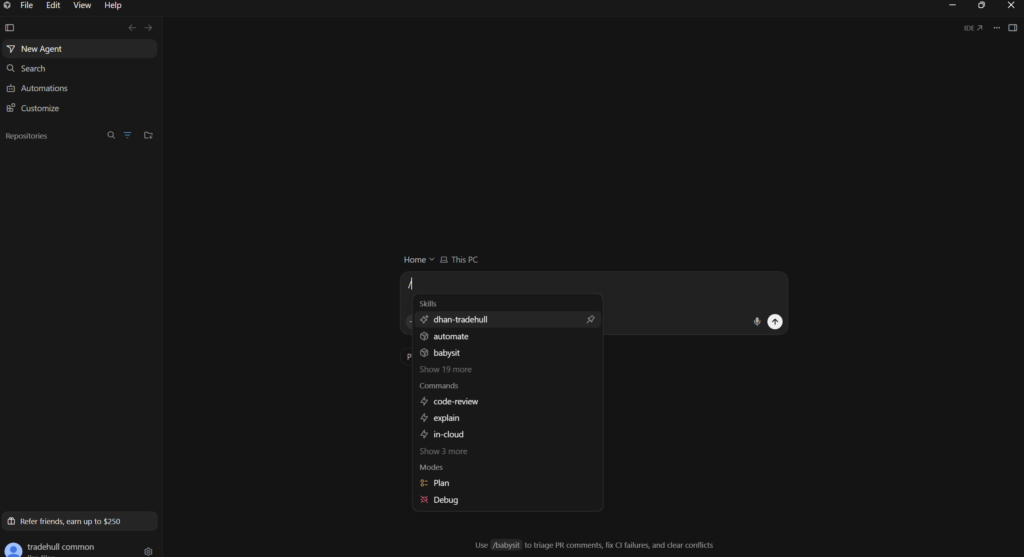
1. Open a new Agent chat and type /
Cursor shows the available skills — you’ll see dhan-tradehull under Skills.
2. Click dhan-tradehull
Cursor inserts /dhan-tradehull into the message box.
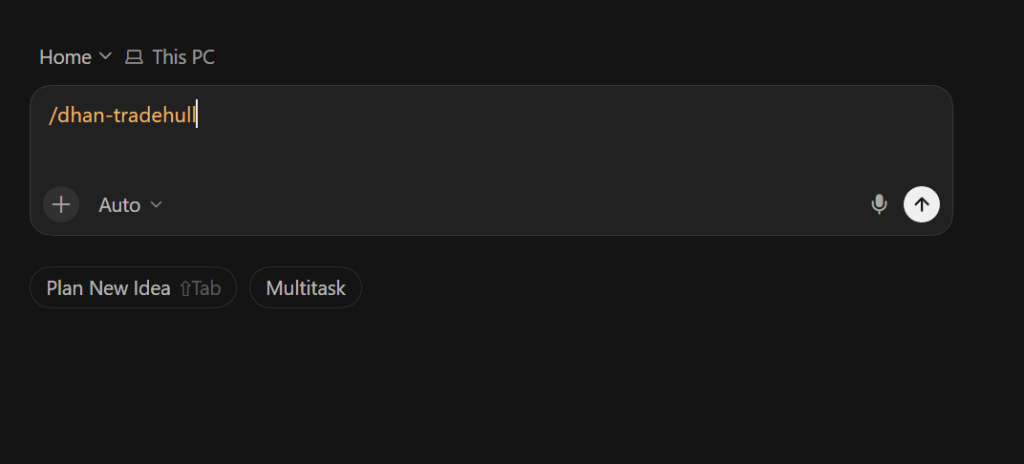
3. Type your request after it
/dhan-tradehull Explain the available Dhan TradeHull login methods. Do not create or modify any files./dhan-tradehull Create a simple Python example to log in and fetch the NIFTY LTP. Do not place any order.03 Initial Setup / Configuration
The skill activates automatically once installed — no build step of its own. What needs configuring is the trading connection your generated code will use.
Authentication modes

Typical initialization pattern
from Dhan_Tradehull import Tradehull

client_code = "YOUR_DHAN_CLIENT_CODE"
access_token = "YOUR_DHAN_ACCESS_TOKEN"

tsl = Tradehull(client_code, access_token)
Project setup checklist
— Latest versions of dhanhq and Dhan-Tradehull installed (pip install –upgrade)
— Dhan API access token generated
— Credentials stored outside source control
— Skill installed into your agent’s skills directory
— Instrument master CSV (~225k rows) available for security ID lookups
04 How It Works
The core idea: progressive disclosure
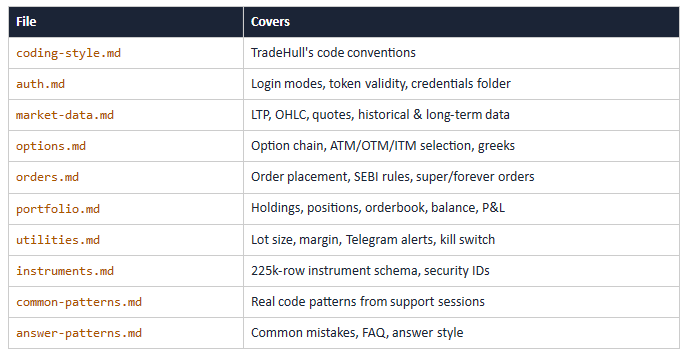
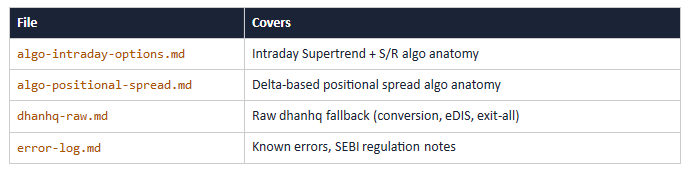
SKILL.md is the single entry point and is always loaded. It doesn’t contain everything — it contains a routing table that tells the agent which of the thirteen deeper reference files to pull in, and only when the task actually needs them.
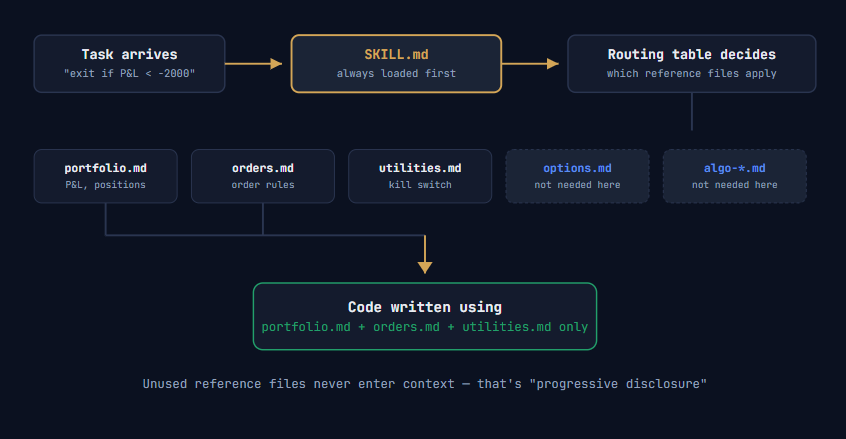
Fig. 2 — SKILL.md routes to only the reference files a task actually needs
Execution flow, step by step
1.The agent receives a task (“build an options straddle exit that checks live P&L”).
2.It loads SKILL.md — always, unconditionally.
3.The routing table matches task keywords to relevant reference files.
4.The agent reads only those files into context.
5.It writes Python using the conventions and rules found there.
Reference files at a glance
05 Basic Usage
You don’t call this skill directly — you ask your AI agent to build something trading-related inside Claude Code, Cursor, or Codex, and the agent pulls in the skill’s guidance automatically.

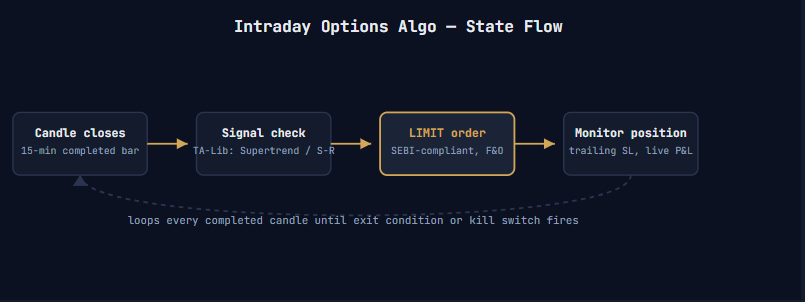
Fig. 3 — the repeating state-machine shape of a generated algo
What the agent produces (illustrative pattern)
Python
from Dhan_Tradehull import Tradehull

tsl = Tradehull(client_code, access_token)

# Lot size fetched dynamically — never hardcoded
lot_size = tsl.get_lot_size("NIFTY")

# get_option_chain() returns TWO values: atm strike + full chain
atm_strike, option_chain = tsl.get_option_chain(
    exchange="NSE", symbol="NIFTY", expiry=0
)

def on_completed_candle(candle):
    bc = candle["close"] > candle["supertrend"]   # buy condition
    sc = candle["close"] < candle["supertrend"]   # sell condition

    if bc:
        # F&O orders must be LIMIT, never MARKET (SEBI rule, Apr 2026)
        tsl.place_order(
            tradingsymbol=option_chain["CE"][atm_strike]["symbol"],
            quantity=lot_size,
            order_type="LIMIT",
            transaction_type="BUY",
            price=option_chain["CE"][atm_strike]["ltp"]
)- get_lot_size(“NIFTY”) is called at runtime — NSE periodically revises lot sizes, and a hardcoded value silently breaks the algo months later.
- Two return values from get_option_chain() is one of the skill’s documented “gotchas” — it exists to stop an agent unpacking the result incorrectly.
- bc / sc (buy/sell condition) is the exact naming convention the skill’s coding-style.md teaches.
- order_type=”LIMIT” is enforced for F&O because of the SEBI rule banning MARKET orders from April 2026.
06 AI Integration
This section covers only this skill’s role inside an AI system — not a general tour of agents or LLMs.
Where it fits in the agent’s workflow
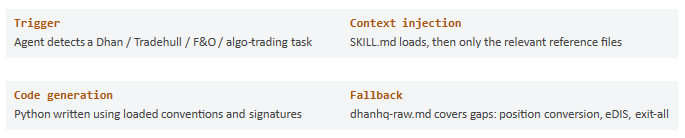
The typical developer loop
1.Install the skill once per project.
2.Describe a trading task in plain language.
3.Review the generated code — still essential, this is live capital.
4.Iterate; the agent keeps consulting the same reference files for consistency.
It operates entirely in the agent’s context/tool-use layer — before code execution, before the broker API is ever called. It shapes what code gets written, not how that code runs afterward.
07 Best Practices
— Always run the latest versions of dhanhq and Dhan-Tradehull — both track exchange and SEBI rule changes
— Keep credentials in a Dependencies/ or .env-style folder, excluded from version control
— Always fetch lot size and margin at runtime instead of hardcoding numbers
— Respect the LIMIT-only rule for F&O orders, even while prototyping
— Use get_historical_data(), not the deprecated get_intraday_data()
— Keep the flat, vertically-aligned coding style (bc/sc conditions, block comments)
— Pair Super Orders with intraday strategies, Forever Orders with positional strategies
— Wire in the kill switch utility for any live-money algo
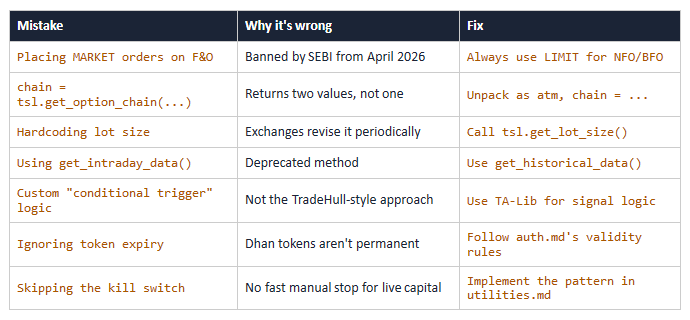
08 Common Mistakes
These recur often enough that the skill’s own answer-patterns.md and error-log.md exist specifically to catch them.
09 Summary
tradehull-dhan-live-algo-skills is a knowledge layer for AI coding agents, sitting on top of the Dhan-Tradehull Python library. By progressively loading a SKILL.md entry point and only the specific reference files a task needs, it helps agents like Claude Code, Cursor, or Codex write Python that:
- Uses correct, current function signatures
- Follows India’s SEBI order-type rules
- Fetches lot sizes and margins dynamically
- Follows one consistent, readable coding style
- Falls back gracefully to raw dhanhq calls when needed
Install it once per project with a single npx skills add command, make sure the pinned library versions are installed, secure your Dhan credentials, and your AI agent is ready to build live algo-trading systems with far fewer of the mistakes that come from stale, general-purpose training data alone.

Source: Imran-Tradehull/tradehull-dhan-live-algo-skills • MIT License • Built By Tradehull