
Without writing a single line of code myself — using a skill-based prompting framework
This post walks through a completely different way of working with AI to build a real, deployable algorithm — a live candlestick pattern scanner — using a structured, skill-based prompting method instead of a single one-shot prompt. By the end, you’ll have a working framework you can reuse to build your own algos, even if you’ve never written a line of Python.

Why the “Normal” Way of Prompting AI Falls Short
- Open ChatGPT (or any AI tool).
- Type a one-line prompt: “Build me a candlestick scanner.
- Hit enter and hope for the best.
The real problem isn’t the AI’s ability to write code. It’s that a single, vague prompt can never carry the full context of what you actually want built.
This is the exact problem we’re going to fix.
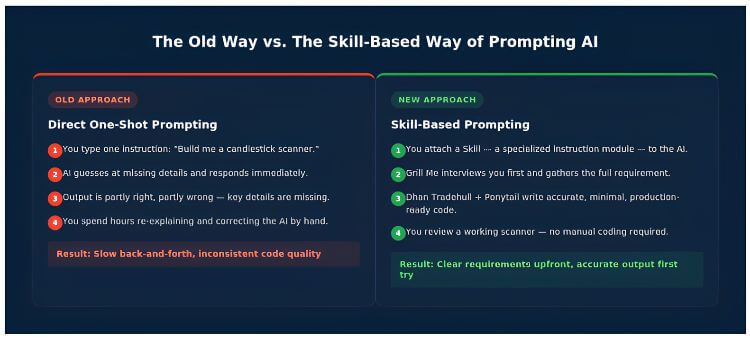
Figure 1: The difference between one-shot prompting and skill-based prompting.
What Are “Skills,” and Why Do They Change Everything?
A Skill is a specialized tool you attach to the AI. Think of it like a plug-in library that makes your prompt more powerful, clearer, structured, and accurate — instead of relying on the AI to guess at what you mean, the Skill guides it toward exactly what you need.

In this build, three Skills were used together:
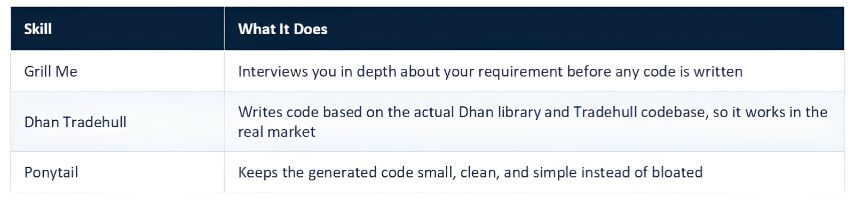
Used together, these three Skills take a single prompt all the way to a production-ready algorithm — one you can actually deploy.
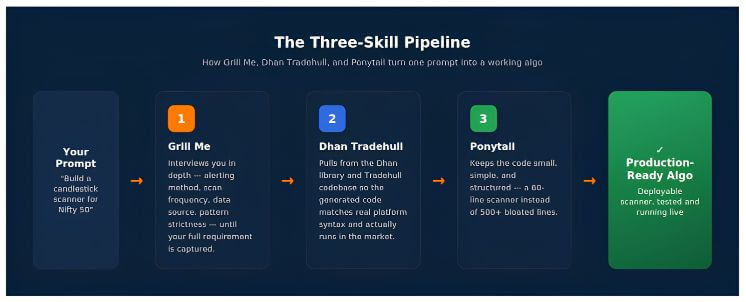
Figure 2: How a single prompt moves through the three-skill pipeline to become deployable code.
Step 1: Setting Up the Environment
For this build, the AI coding was done directly inside Cursor — an AI-powered code editor that can write, edit, and run code on your behalf. Instead of pasting prompts into a chat window and copying code back out, Cursor’s agent works directly inside your project folder.
To start, a new agent session was opened inside Cursor using the + button, creating a fresh AI agent ready to receive instructions.

Step 2: Writing the Initial Prompt
The first prompt given to the AI agent was simple and direct:
Normally, this is the point where the AI would just start writing code based on assumptions. Instead, the Grill Me skill was invoked here, with a simple instruction:
This one line changes the entire interaction. Instead of guessing, the AI now switches into requirement-gathering mode.
Step 3: Letting “Grill Me” Interview You
Once Grill Me is active, the AI starts asking targeted questions — one at a time — to fully understand the requirement before touching any code. Here’s what that interview actually looked like:
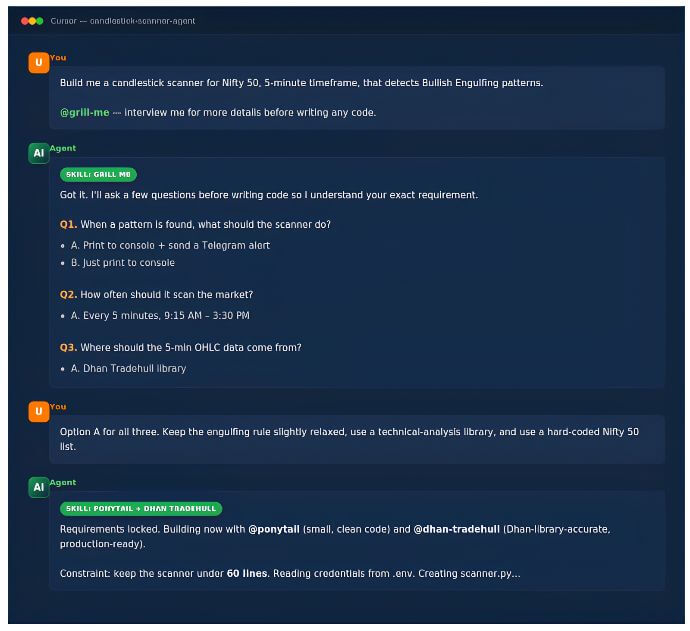
Figure 3: The Grill Me skill interviewing the user inside Cursor before any code is generated.
The interview covered questions like:
- What should happen when a pattern is found? → Print to console and send a Telegram message.
- How often should the scanner run? → Every 5 minutes.
- Where should the 5-minute OHLC data come from? → The Dhan Tradehull library.
- How strict should the Engulfing pattern rules be? → Slightly relaxed, using a technical analysis library.
- Where should the Nifty 50 stock list come from? → A hard-coded list.

Once every question is answered, Grill Me consolidates everything into a final scope: scan every 5 minutes from 9:15 AM to 3:30 PM, run on Nifty 50, detect Engulfing patterns using the Dhan Tradehull library, and send alerts via Telegram, with all credentials stored securely in an .env file.
Step 4: Building the Algo with Ponytail + Dhan Tradehull
With the requirement fully captured, it was time to actually generate the code. This is where the second and third skills come in together:
Here’s what each skill contributes at this stage:
- Dhan Tradehull ensures the generated code is built around the real Dhan library and Tradehull’s existing codebase — the same source that used to be referenced manually before every build. This is what makes the code actually work when deployed in the live market, instead of producing syntax that looks plausible but fails in practice.
- Ponytail keeps the implementation lean. Left on their own, AI models tend to write bloated code — 500, sometimes 1,000 lines for a task that doesn’t need it. Ponytail pushes in the opposite direction: the simpler and shorter the code, the more reliably it runs. A 60-line constraint was set here specifically because a scanner like this doesn’t need to be any larger.

Along with the scope, the necessary credentials — Dhan API key, Telegram bot token, and chat ID — were provided so the agent could wire up the .env file itself.
Step 5: Watching the AI Build and Test the Scanner
From here, the process became mostly hands-off. The agent:
- Created an .env file and populated it with the Dhan and Telegram credentials.
- Created scanner.py and wrote the complete scanning logic.
- Ran a test cycle, including sending a sample Telegram message to confirm the bot connection worked.
- Logged into Dhan and began the live scan loop.
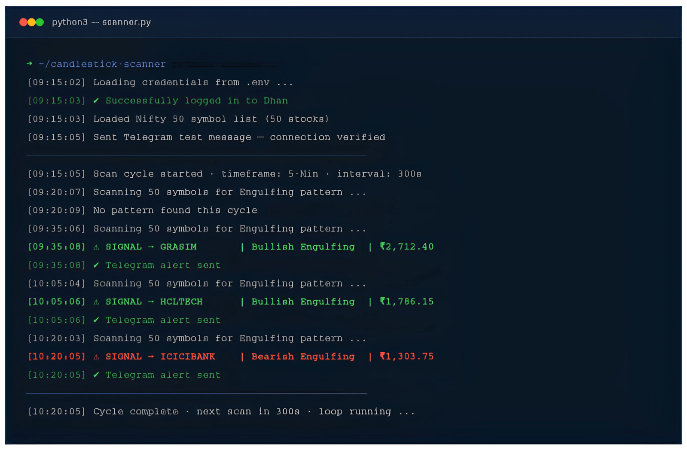
Figure 4: The scanner running live — logging in, scanning every 5 minutes, and printing detected signals.
Within the first few scan cycles, the algo picked up genuine signals — a Bullish Engulfing pattern on Grasim, another on HCL Technologies, and a Bearish Engulfing pattern on ICICI Bank. Each one triggered an instant Telegram alert.
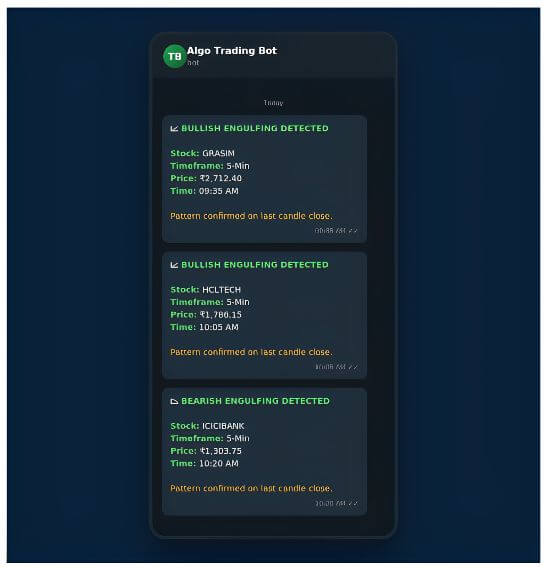
Figure 5: Live Telegram alerts fired the moment each pattern was confirmed on candle close.
Reading the Signals: What an Engulfing Pattern Looks Like on the Chart
To understand why the scanner flagged these three stocks, it helps to see the pattern visually. An Engulfing pattern forms across two candles — the second candle’s body completely “engulfs” the body of the candle before it, signaling a potential reversal.
Grasim Industries — Bullish Engulfing
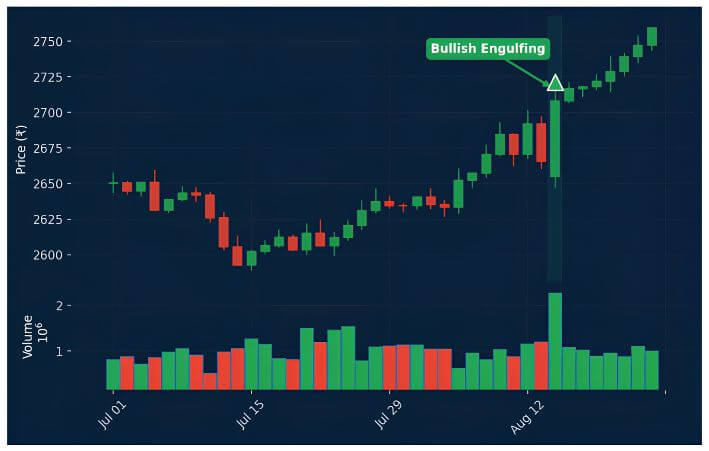
Figure 6: A small red candle is followed by a larger green candle that fully engulfs it — a Bullish Engulfing signal.
HCL Technologies — Bullish Engulfing
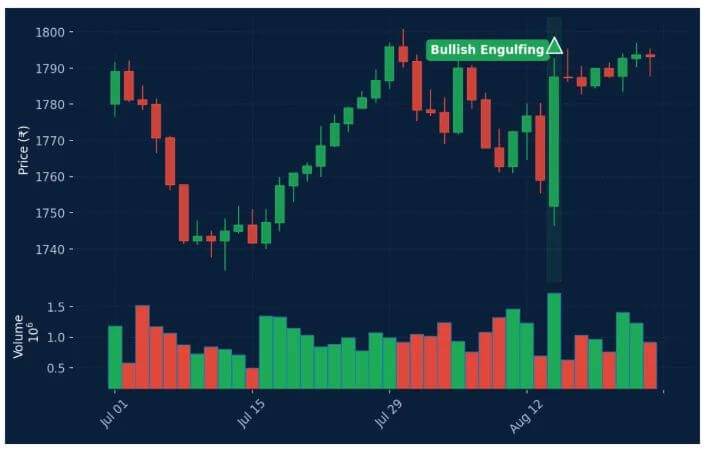
Figure 7: The same pattern repeating on HCL Technologies, accompanied by a volume spike on the engulfing candle.
ICICI Bank — Bearish Engulfing
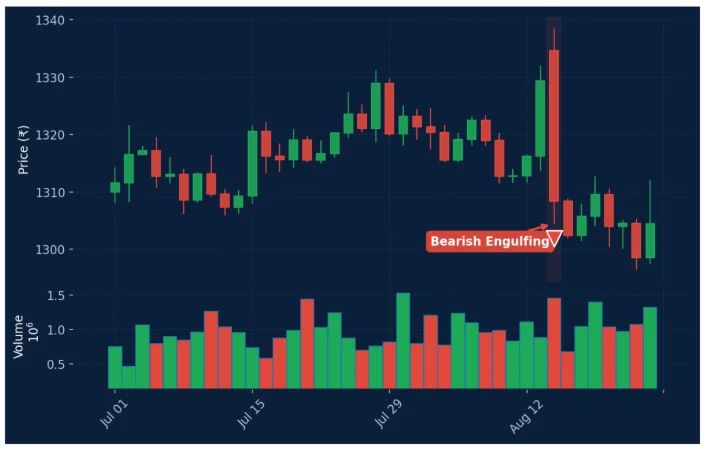
Figure 8: The mirror image on ICICI Bank — a green candle followed by a larger red candle that engulfs it, signaling potential downside.

Why This Approach Works Better
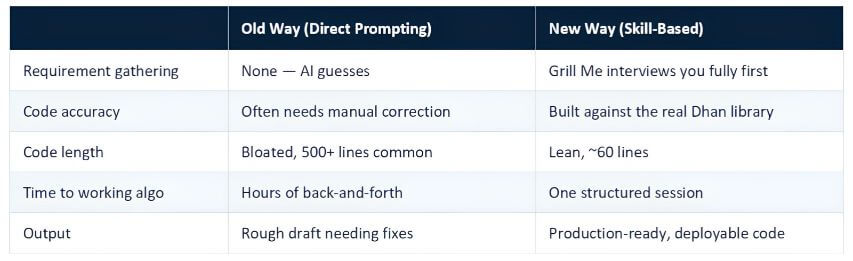
The core lesson isn’t really about candlestick scanners — it’s about how you work with AI. Two things determine whether AI-generated code actually works:
- Complete requirements, gathered systematically instead of assumed.
- Correct references, so the AI is grounded in the real library and codebase instead of guessing at syntax.
Get both right, and the AI can take you from a single sentence to a working, deployable algorithm in one sitting.
Summary
- The usual way of prompting AI — one message, hope for the best — leads to incomplete, inaccurate code and hours of manual correction.
- Skills are specialized modules that guide the AI toward a specific, well-defined output.
- Grill Me interviews you thoroughly before any code is written, ensuring nothing important is missed.
- Dhan Tradehull grounds the AI in the real Dhan library and Tradehull codebase so the code actually works in the live market.
- Ponytail keeps the code small, clean, and reliable — 60 lines instead of hundreds.
- Using all three together, a live 5-minute candlestick scanner was built, tested, and deployed — detecting real Bullish and Bearish Engulfing signals on Grasim, HCL Technologies, and ICICI Bank, with instant Telegram alerts.
- This same three-skill framework can be reused to build almost any algo, regardless of your coding background.
Resources
YouTube Video: Watch the full walkthrough
Code Files: Download from Google Drive